SMS for your WooCommerce shop
The Web2SMS for WooCommerce plugin sends an SMS to your customer by itself every time the status of their order changes: "we received your order", "your order is on its way". Fewer "where is my parcel?" phone calls, and customers who feel looked after.
What it does
- SMS to the customer for the order statuses you choose, with your own text for each one.
- SMS to you for every new order (if you want it).
- Your credit balance inside the admin area of your shop.
- A note on every order saying what was sent and whether it reached the phone.
- Test SMS with one button, to see that everything works.
Before you start
The plugin is free and open to everyone: you can download it and try it with no commitment. For it to send SMS, two things are needed:
Sign up at web2sms.gr. If you do not have an account yet, sign up (the Web2SMS site is in Greek). The SMS are sent with the credits of your account; see the prices.
Activation by us. We switch on the use of the plugin for your account. After you sign up, call us on +30 210 95 88 555 or write to fixplace.gr@gmail.com and we activate it.
Your shop needs WordPress 6.2 or newer, WooCommerce 7.1 or newer and PHP 7.4 or newer.
1 Download the plugin
Press the "Download the plugin (zip)" button at the top of this page. A file named web2sms-woocommerce.zip is saved on your computer. Do not open it; you will upload it as it is.
2 Install it on your shop
- Log in to the admin area of WordPress.
- In the menu on the left press Plugins and then Add Plugin.
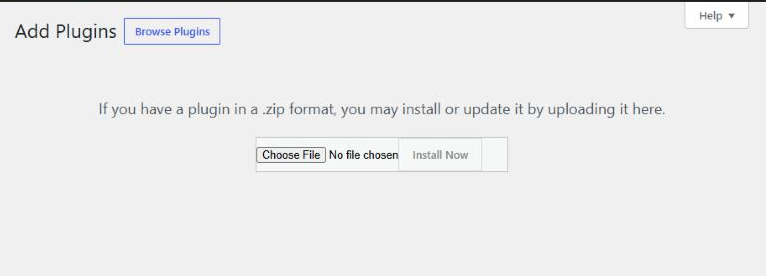
- At the top press the Upload Plugin button.
- Press Choose File, pick the
web2sms-woocommerce.zipyou downloaded and press Install Now. - When it finishes, press Activate Plugin.
3 Get your API key from Web2SMS
- Log in to your account at www.web2sms.gr.
- In the menu press Προγραμματιστές (API) ("Developers").
- If you do not have a key yet, press Δημιουργία κλειδιού ("Create key").
- Under "Το κλειδί σας" ("Your key") press Αντιγραφή ("Copy").
You do not see the "Προγραμματιστές (API)" menu? Then we have not activated the plugin for your account yet. Call us on +30 210 95 88 555 or write to fixplace.gr@gmail.com.
The key works like a password: whoever has it can send SMS with your credits. Do not share it.
4 Connect the shop with your account
- In the WordPress admin press WooCommerce and then Web2SMS.
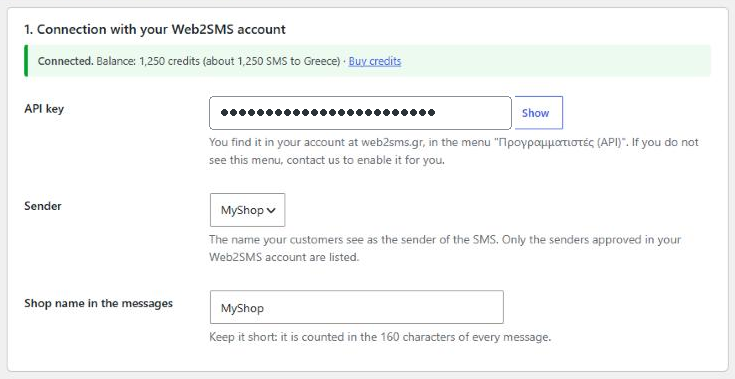
- Paste the key in the API key field and press Save at the bottom of the page.
- If everything is right, you see a green Connected message and your credit balance.
- Choose the Sender (the name your customer sees as the sender of the SMS) and write a short shop name.
5 Set the messages
Tick the order statuses for which an SMS should go out and write the text of each one. The two most useful ones are ready and switched on: Processing (as soon as the order is placed) and Completed (when you ship it).
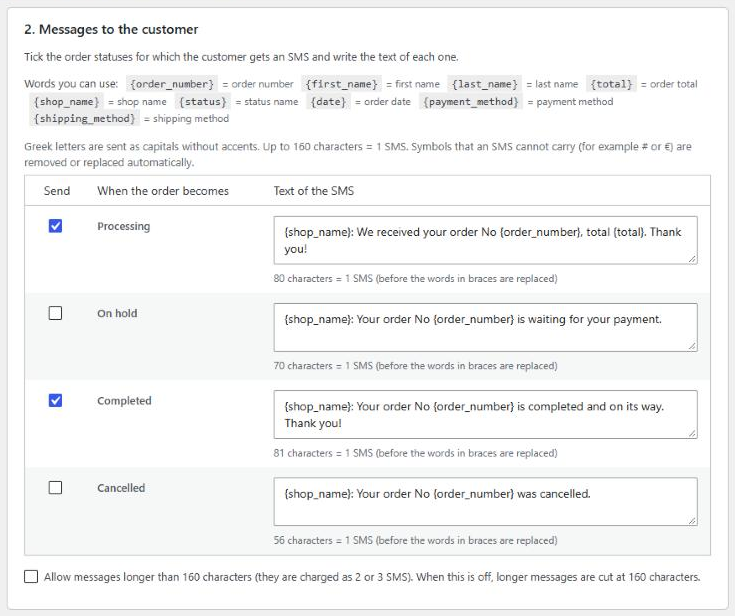
Inside the text you can use the words below. The plugin replaces them with the details of each order:
| You write | It becomes |
|---|---|
{order_number} | The order number |
{first_name} | The customer's first name |
{last_name} | The customer's last name |
{total} | The order total, for example 17.90 EUR |
{shop_name} | The shop name you wrote in step 4 |
{status} | The name of the status |
{date} | The order date |
{payment_method} | The payment method |
{shipping_method} | The shipping method |
Three things about the text
- Greek letters reach the phone as capitals without accents. You write normally.
- Up to 160 characters = 1 SMS. Unless you tick "Allow messages longer than 160 characters", a longer message is cut at 160 so that you are not charged more.
- Symbols an SMS cannot carry (for example # or €) are removed or replaced automatically. The € becomes EUR.
6 If you like: SMS to you and delivery reports
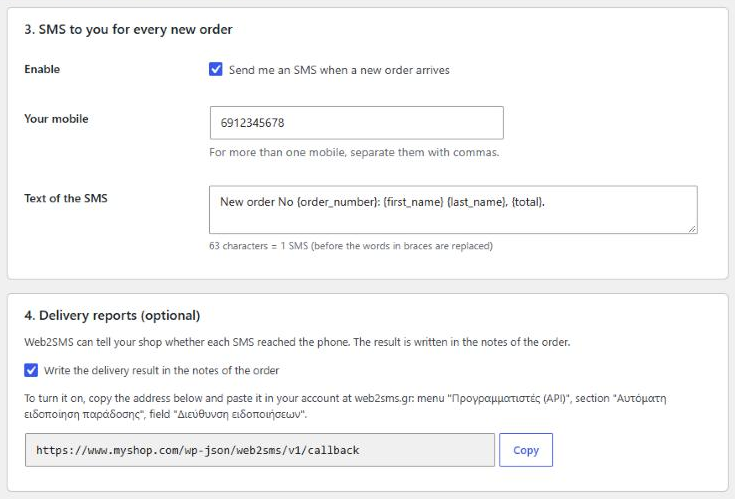
SMS to you for every new order. Tick "Send me an SMS when a new order arrives" and write your mobile. For more than one mobile, separate them with commas.
Delivery reports. Web2SMS can tell your shop whether each SMS reached the customer's phone. To turn it on:
- In section 4 of the plugin press Copy next to the address.
- At web2sms.gr, in the menu Προγραμματιστές (API), find the section Αυτόματη ειδοποίηση παράδοσης ("Automatic delivery notification"), paste the address in the field "Διεύθυνση ειδοποιήσεων" and press Αποθήκευση ("Save").
7 Run a test
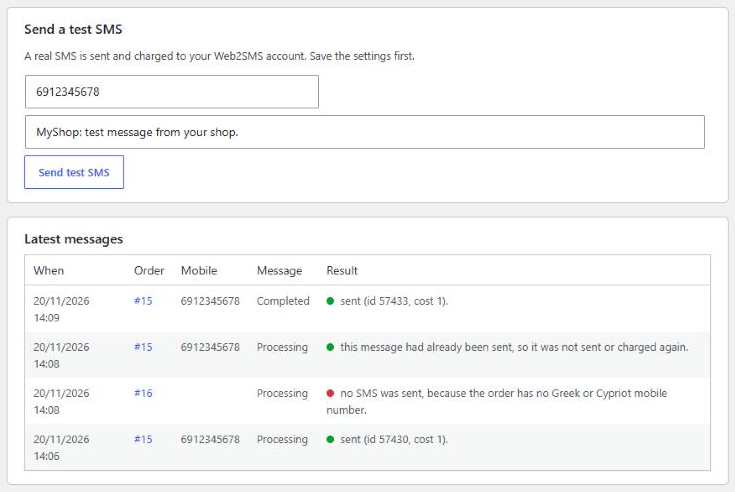
Press Save first. Then, in the "Send a test SMS" section, write your mobile and press the button. You receive the message within a few seconds. The test is a real SMS and is charged.
You are ready. From now on the SMS go out by themselves.
In everyday use
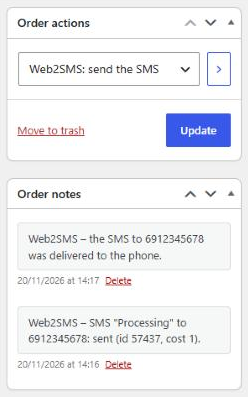
What was sent for each order. Open the order and look at its notes, on the right. Every SMS that went out is written there and, if delivery reports are on, whether it reached the phone.
Send an SMS again? In the "Order actions" box choose Web2SMS: send the SMS and press the arrow. The message of the order's current status is sent.
All together. On the WooCommerce → Web2SMS page, under "Latest messages", you see the 20 most recent SMS and their result.
Frequent questions
How much does it cost?
The plugin is free and open to everyone to try. You pay only for the SMS you send, from the credits of your account. One SMS of up to 160 characters to a Greek mobile is charged 1 credit. See the prices.
Why do I need to sign up and be activated?
The SMS go out through your account at web2sms.gr, which is why you sign up. We activate each account ourselves, so that we know which shop is sending and can help you get started. A phone call or an e-mail is enough.
Which mobiles can it send to?
Mobiles in Greece and Cyprus. Sending to Cyprus is enabled by us on your account; call us. Landlines and numbers of other countries are skipped and not charged.
How fast does the SMS go out?
Usually within a few seconds, at most a minute or two after the status changes. Sending happens in the background, so that the checkout is not slowed down for your customer.
Can the customer get the same SMS twice?
No. The same message for the same status of the same order is not sent or charged a second time within 24 hours, even if the order changes status and comes back. If you want to send it again on purpose, you do it from the order actions.
A customer did not get an SMS. What do I check?
Open the order and read the Web2SMS note. It says exactly what happened: for example that the customer gave a landline, that your credits ran out, or that the phone was switched off.
What happens if my credits run out?
The SMS stop going out and your shop e-mails you (once a day) so that you know. As soon as you buy credits, they continue normally. You always see your balance on the WooCommerce → Web2SMS page.
How do I remove the plugin?
From the "Plugins" page: Deactivate and then Delete. Its settings are deleted with it. The notes on the orders stay.